
July 22, 2026
What Is Social Retargeting and How Does It Work?
Social retargeting is a digital marketing strategy that serves tailored social media ads to users who previously visited an online store or interacted with a brand's content.
Drishti, Manager - Digital Marketing

Table of Contents
- What is Social Retargeting?
- How Does Social Retargeting Work for Online Retail?
- What are the Types of Social Retargeting Campaigns?
- What are the Benefits of Social Retargeting Ad Campaigns?
- Social Retargeting Strategies That Boost Conversion
- Social Retargeting Best Practices by Platform
- How to Do Social Retargeting
- What Social Retargeting Mistakes Should You Avoid?
- Scaling Your Ad Networks With Flipkart Retail Media
What Is Social Retargeting and How Does It Work?
Most online shoppers leave an e-commerce store without purchasing on their first visit. They tend to browse, click around, get distracted, and leave without completing a purchase. Social retargeting is the strategy retailers use to bring those exact shoppers back by showing them tailored ads on the social platforms they already scroll every day.
In this guide, we'll break down how social retargeting works, the different retargeting campaign types, and how to run it well without wasting ad spend.
- Social retargeting shows ads to shoppers who already visited your store or interacted with your brand.
- Social retargeting is powered by a tracking pixel that logs behavior, then matches it to the shopper's social profile.
- Three retargeting campaign types: pixel-based, social engagement, and CRM list retargeting.
- Done right, it lowers cart abandonment, improves ROAS, and keeps ad spend focused on shoppers who've already shown real intent.
- Best practices for social retargeting shift by platform: what works on Meta doesn't automatically work on TikTok or Pinterest.

What is Social Retargeting?
Social retargeting, also called social media retargeting, is a digital advertising tactic that shows tailored ads on social media apps to people who have already visited your online store.
A solid social media retargeting strategy ensures your brand doesn't get forgotten even after shoppers interact with your online store but leave without a purchase. It follows up with those window shoppers later, showing them the exact products they looked at as they scroll through Instagram, Facebook, or TikTok, and gently pulls them back to finish what they started. When done well, over time, this turns cold, lost traffic into warm, high-converting leads.
How Does Social Retargeting Work for Online Retail?
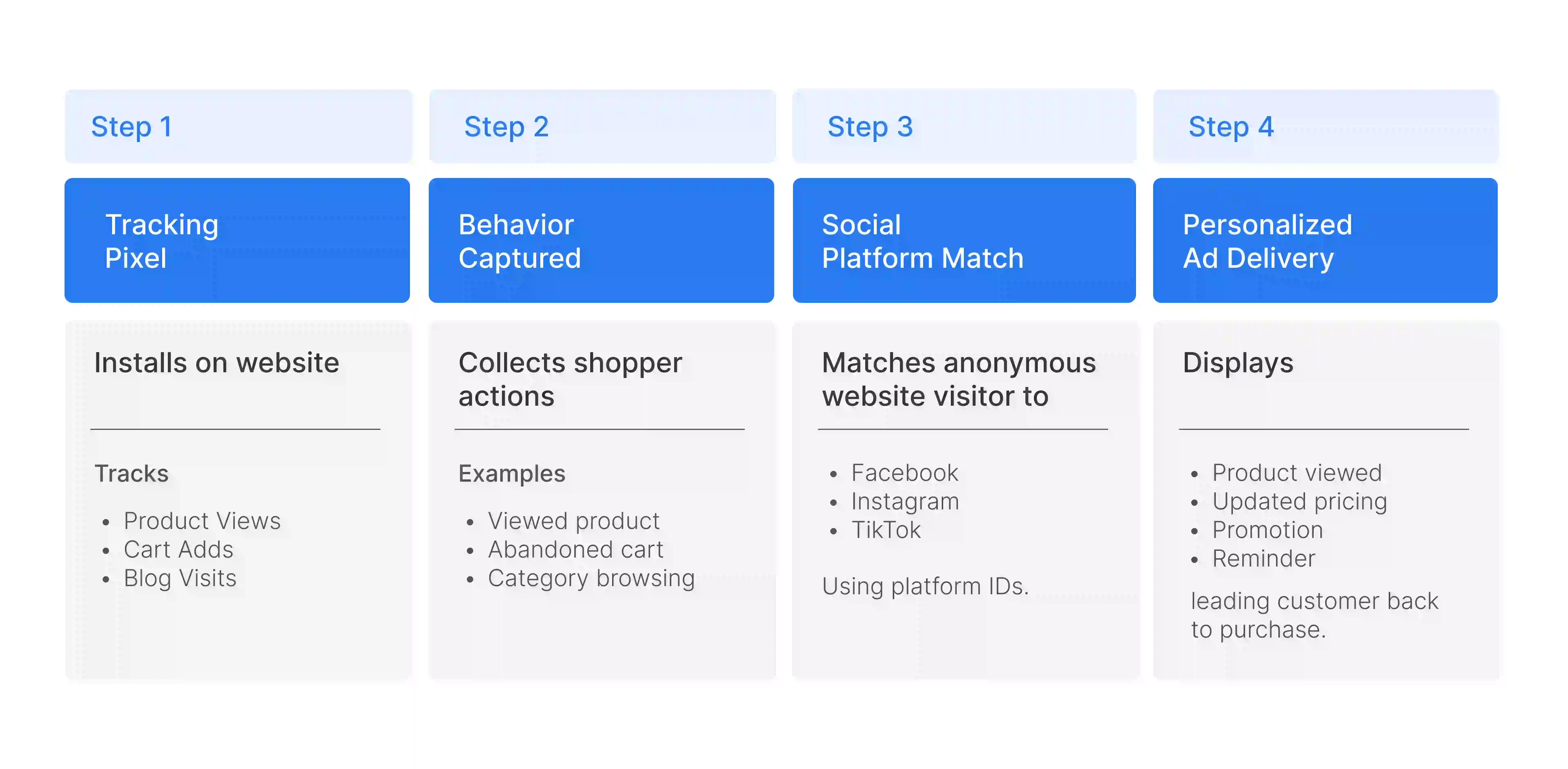
Social media retargeting runs on a simple chain of tracking, matching, and delivery, and it happens automatically once it's set up correctly. This plays out in four steps.
- The Code Trigger: Everything begins with a small snippet of tracking code, such as a Meta Pixel or TikTok Pixel, that gets installed onto your online store's backend. This pixel acts as the eyes of the whole system, sitting quietly in the background so it can start picking up on shopper activity the moment someone lands on your site.
- The Behavior Tag: Once the pixel is live, it logs specific shopper behavior anonymously, so whenever someone browses a particular product, reads a blog post, or adds an item to their cart and leaves without buying, that exact action gets tagged and recorded. This behavioral data is what makes the retargeting ad relevant later, since it tells the system precisely what the shopper cared about.
- The Social Match: The tracking system then takes that anonymous behavior and safely matches it to the shopper's active profile on social media platforms, essentially connecting what they did on your website to who they are on Instagram, Facebook, or TikTok. This matching step is what allows an ad to follow a specific person instead of just going out to a random audience.
- The Ad Delivery: Once the match is confirmed, the ad system automatically displays a tailored ad in that person's social feed, often built around the exact product they viewed and paired with a promo code or a limited-time incentive designed to pull them back to complete the purchase.
Keeping your product feeds accurate matters a great deal at every one of these stages, since a stale feed can end up advertising items that are already out of stock, which wastes ad spend and frustrates shoppers before they even click through.
Also Read: Conversion Rate Optimization
What are the Types of Social Retargeting Campaigns?
Not all social retargeting works the same way, and brands typically rely on a mix of pixel-based, social engagement, and list-based CRM retargeting depending on the kind of data they have available.
1. Pixel-Based Website Retargeting
Pixel-based website retargeting uses the tracking pixel on your site to target shoppers based on their exact on-site actions, such as visiting a specific product page or adding an item to their cart. Because pixel-based data reflects real, recent intent rather than a guess, it consistently delivers ultra-high intent leads, making it one of the strongest methods for recovering abandoned carts.
2. Social Engagement Retargeting
Social engagement retargeting targets people based on how they interact with your content directly on social platforms, such as watching a TikTok video all the way through, commenting on a post, or saving an Instagram photo for later. Since these social media interactions show genuine interest without necessarily involving your website, social engagement retargeting works especially well for building brand awareness and community trust over time rather than pushing for an immediate sale.
3. List-Based CRM Retargeting
List CRM retargeting works by uploading a secure list of existing customer emails and matching those contacts to their active social media profiles, so businesses can reach people who already know and trust your brand. This type of social retargeting usually works alongside a Customer Data Platform (CDP), which keeps customer records clean and accurate enough for the matching to succeed, making it an excellent way to cross-sell new catalog items to loyal, repeat buyers.
What are the Benefits of Social Retargeting Ad Campaigns?
When set up correctly, the benefits of social retargeting go well beyond just recovering a lost sale here and there.
- Lowers Cart Abandonment: Social retargeting ad campaigns reach shoppers who left items sitting in their cart with a direct, well-timed reminder of exactly what they were about to buy, recovering sales that would otherwise have been lost for good.
- Improves Return on Ad Spend (ROAS): By shifting your budget away from broad, cold audiences who have never heard of your brand and instead concentrating it on warm leads who have already shown real buying intent, social retargeting ad campaigns increase the chances of purchase, which naturally produces a better return per dollar spent on ads.
- Delivers Hyperpersonalization: Social retargeting ad campaigns deliver genuinely personal ad experiences, letting you show a dynamic ad featuring the precise image, color variation, and price of the product a shopper was looking at just hours earlier, so the ad feels tailored to the shopper rather than generic and easy to ignore.
- Boosts Organic Brand Recall: When potential customers are familiar with a brand, their chances of making a purchase increase. Social retargeting ad campaigns naturally show your ecommerce store on a user's social feed to build familiarity over time and make that shopper more likely to choose your store over a competitor once they are finally ready to buy.
Social Retargeting Strategies That Boost Conversion
Beyond the basic setup, a few specific strategies consistently push conversion rates higher for brands running social retargeting at scale.
- Sequential Retargeting Journeys: Change your ad creative as time passes instead of showing the same ad on repeat, so you might show a standard product ad on day one, follow it with a customer video review on day three to build trust, and then offer a 10% discount code by day seven to finally close the sale.
- Cross-Channel Retargeting Funnels: Re-engage shoppers wherever they're active now, even if they first discovered your store somewhere else entirely, like through an organic Google search or an email newsletter, so no single channel is left working in isolation from the others. This kind of consistency across channels supports a broader omnichannel retail approach, where the shopping experience feels connected no matter where a customer shows up.
- Lookalike Expansion Ingestion: Using data from your already high-converting retargeted audience to build a lookalike audience helps the platform find entirely new, cold shoppers who share the same behaviors and preferences as your best existing buyers.
Also Read: What is Customer Acquisition?
Social Retargeting Best Practices by Platform
A social media retargeting strategy that works on one platform won't necessarily work the same way on another, so it helps to adjust your approach based on where your audience actually spends their time.
Social Retargeting on Meta (Facebook & Instagram)
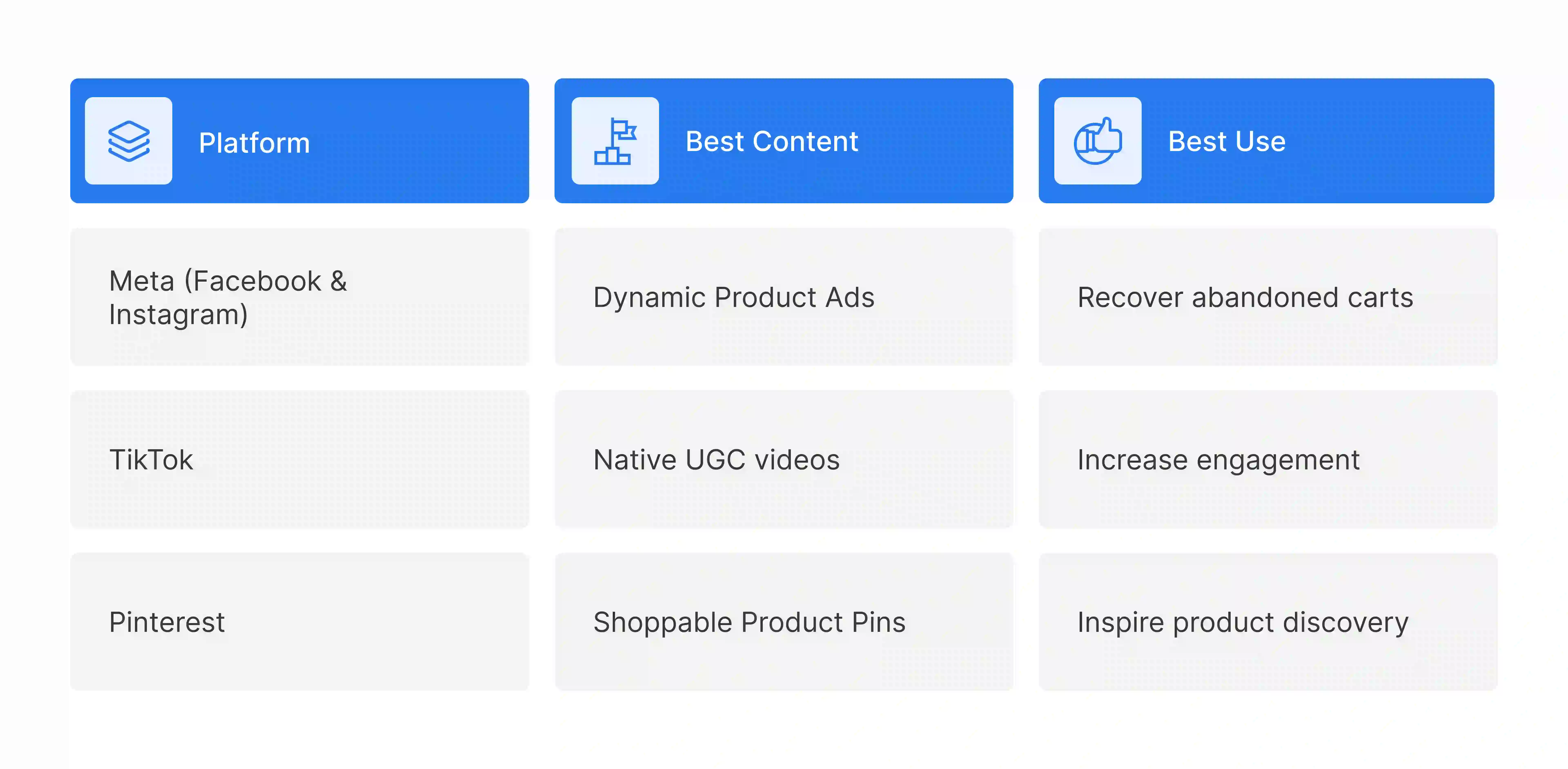
Retargeting on Meta platforms like Facebook and Instagram performs best when you optimize for Dynamic Product Ads. Make sure your product catalogue syncs cleanly with Meta, since this is what allows the ad carousel to automatically match whatever a specific user was browsing on your site.
Social Retargeting on TikTok
TikTok rewards fast-paced, user-generated content(UGC) and native-feeling video styles far more than polished, traditional banner ads, which tend to look out of place and get scrolled past in a feed built around authenticity.
Social Retargeting on Pinterest
Use highly visual Shoppable Product Pins, since users on the platform are typically already in a discovery and receptive mindset, actively planning purchases or gathering aesthetic inspiration rather than just passing time.
How to Do Social Retargeting?
Once your pixel tracking is in place, these operational steps determine whether your social media retargeting campaigns actually perform or just quietly burn through budget.
Step 1: Segment Your Audiences by Intent
By creating separate groups for casual homepage browsers, product page viewers, and high-intent cart abandoners, instead of showing everyone the same generic ad, since each of these groups is at a different stage of deciding to buy and needs a different message to move forward. Aligning this audience data with your promotions management workflows lets you serve targeted discounts that match their specific stage of intent.
Step 2: Set Smart Frequency Caps
Limit how many times a single person sees your retargeting ad each day, because showing it too often leads to ad fatigue and can leave shoppers annoyed with your brand instead of persuaded to buy.
Step 3: Implement a Burn Pixel
A burn pixel is a crucial line of code that automatically stops showing retargeting ads to a customer the moment they complete their purchase, which prevents your ad budget from being wasted on impressions aimed at someone who has already converted.
Step 4: Use Diverse Creative Formats
Create and test a mix of ad styles, such as video testimonials, image carousels, and customer review overlays, so you can identify which format actually earns attention in a crowded, fast-scrolling feed.
What Social Retargeting Mistakes Should You Avoid?
Even a well-planned social retargeting strategy can lose effectiveness fast if these common operational mistakes slip through.
- Forgetting the Burn Pixel: The most common and costly mistake brands make in social retargeting is continuing to show ads to customers who already bought the item. This wastes ad budget on buyers who can't convert again and can irritate buyers who feel like the brand isn't paying attention.
- Ad Frequency Oversaturation: Oversaturation happens when the same ad is shown to a user many times in a single day, which causes instant ad fatigue and can quietly destroy the brand trust that took real effort to build in the first place.
- Mismatched Landing Pages: If a person clicks an ad for a specific product and lands on your generic store homepage instead of that exact product page, you've added friction right at the moment they were ready to convert. Most shoppers simply won't bother finishing the journey.

Scaling Your Ad Networks With Flipkart Retail Media
Running high-performing social retargeting campaigns takes more than good ad creative. It takes the front end and the back end working in sync. If your retargeting ad successfully convinces a shopper to click back, but they land on a broken product link, a size that's no longer available, or a price that doesn't match what they saw in the ad, you've lost the sale anyway, and the ad spend that got them there is wasted.
This is exactly the gap that Flipkart Commerce Cloud (FCC) closes. By keeping inventory, pricing, and product data accurate and synced across every channel, FCC ensures that the moment a retarget doesn’t land on a broken product link, a site that's no longer available, or a price that doesn't match what they saw in the ad, what they land on actually matches what they were promised. That reliability is also what makes it easier to build out a genuine retail media platform strategy on top of your existing ad spend, instead of constantly patching data gaps between marketing and inventory. The result is retargeting that runs on absolute accuracy, protecting both your ad budget and your profit margins.
Book a demo with FCC today and see how an accurate, real-time commerce infrastructure can turn your retargeting clicks into completed sales.
FAQ
When exploring what alternatives exist to third-party cookies for social targeting, marketers primarily rely on first-party data, server-side tracking APIs, and contextual advertising. By actively collecting zero- and first-party data directly through your own websites, apps, and customer data platforms, you can build privacy-compliant audience segments that serve as highly effective alternatives to third-party cookies for social targeting.
The process involves uploading your secure customer relationship management (CRM) data directly into the social advertising platforms. By syncing these encrypted email lists and offline purchase records as custom audiences, the networks match your information to active user profiles, enabling you to seamlessly use offline conversions and email lists for social retargeting campaigns.
To accurately measure the ROI of your social retargeting ads, you must track the direct revenue generated by these specific campaigns and compare it against your total retargeting ad spend. By implementing platform-specific conversion pixels, integrating your ecommerce analytics, and applying multi-touch attribution models, you can easily measure the ROI of your social retargeting ads to determine their true profitability and impact.
Retargeting is a digital marketing process that serves relevant ads to potential customers who previously engaged with your brand. This framework uses tracking tags across ad platforms to re-engage warm traffic at the right time, providing a strategic second chance to guide users toward taking their desired action.
The different types of retargeting include pixel-based website tracking, social media engagement flows, and list-based email campaigns. Brands like Markopers separate their target audience into distinct audience segments using email addresses or tracking codes across networks like Google Ads, allowing brands to serve customized display ads, video ads, or native ads efficiently.
An example of retargeting occurs when a user abandons an online shopping cart and later sees tailored Facebook ads featuring those exact items. Utilizing Facebook Ads Manager allows the retailer to display targeted customer testimonials alongside the product carousel, effectively encouraging the shopper to take the next step and complete checkout.