
October 24, 2026
Product Guides and the Ecommerce Buying Journey
Product guides are customer-facing ecommerce resources that help shoppers understand, evaluate, and compare products before purchasing. They organize product information, including features, specifications, images, and buying advice, to help customers identify suitable options. Retailers use buying guides, comparison guides, and catalog-style resources to support product discovery and purchasing decisions.
Drishti, Manager - Digital Marketing

Table of Contents
- What Are Product Guides?
- What Is the Difference Between a Product Guide and a Product Catalog?
- What Are the Different Types of Product Guides in Ecommerce?
- What Are the Key Features of an Effective Product Guide?
- Why Are Product Guides Important for Ecommerce Retailers?
- What Are Some Examples of Product Guides in Ecommerce?
- How Can Retailers Create Effective Product Guides?
- Conclusion
Product Guides and the Ecommerce Buying Journey
Online shoppers often compare several products before deciding what to buy. Clear product information, relevant comparisons, and visual content help them understand the available options and assess which products meet their needs.
For ecommerce retailers, product guides offer a way to support this decision-making process, particularly when shoppers need help understanding unfamiliar features or choosing between similar products. This article explores the different types of product guides, their essential features, benefits, practical examples, and how retailers can create guides that help customers make informed purchasing decisions.
What Are Product Guides?
Product guides are customer-facing ecommerce resources that organize and explain product information to help shoppers understand available options and make informed purchasing decisions. They provide relevant details about products, such as their features, specifications, and suitability for different needs, helping customers evaluate their choices before buying.
Depending on their purpose, product guides may include category-based product listings, buying advice, comparisons between similar products, or explanations of specific features and specifications. Some help shoppers narrow down product options, while others explain what to consider when choosing a particular type of product.
What Is the Difference Between a Product Guide and a Product Catalog?
A product catalog primarily organizes and displays a retailer’s available products, while a buying-oriented product guide helps shoppers evaluate different options and choose products that meet their needs. Both provide product information, but they differ in how that information supports purchasing decisions.
|
Product Guides vs. Product Catalogs |
||
|---|---|---|
|
Aspect |
Product Catalog |
Product Guide |
|
Purpose |
Helps shoppers browse and discover products within a retailer’s assortment. |
Helps shoppers compare options and select products based on their needs. |
|
Content |
Product names, images, descriptions, prices, specifications, and availability. |
Buying advice, selection criteria, product comparisons, and explanations of relevant features. |
|
Organization |
Typically arranged by product categories, brands, or attributes, with filters for navigation. |
Often organized around customer needs, intended uses, or purchasing considerations. |
|
Ecommerce applications |
Browsing an electronics category to explore available laptops. |
Using a laptop buying guide to compare specifications and identify a suitable model. |
The distinction is not absolute. Catalog-style product guides can combine organized product listings with comparisons, explanations, and buying advice. The key difference lies in whether the resource primarily presents available products or helps shoppers evaluate which options best suit their requirements.
What Are the Different Types of Product Guides in Ecommerce?
The main types of product guides in ecommerce include buying guides, comparison guides, category-specific selection guides, and catalog-style product guides. Each format helps shoppers answer different questions when researching products and deciding what to purchase.
- Product buying guides: Explain what customers should consider before buying a product, including its intended use, important features, specifications, and budget. They help shoppers answer questions such as, “What should I look for when choosing this product?”
- Comparison guides: Present two or more product options side by side, highlighting differences in features, specifications, prices, or suitability. They help shoppers answer, “Which of these products best meets my needs?”
- Category-specific selection guides: Help customers narrow their choices within a particular product category based on intended use or personal preferences. For example, a running shoe guide might organize options by terrain or running activity, helping shoppers determine which products suit their requirements.
- Catalog-style product guides: Organize available products into browsable collections, often combining product images, descriptions, specifications, and brief buying advice. They help customers understand what options are available and explore different products within a retailer’s assortment.
These formats are not mutually exclusive. An ecommerce retailer may combine buying advice, product comparisons, and catalog-style listings in one guide to support different stages of the customer’s purchasing decision.
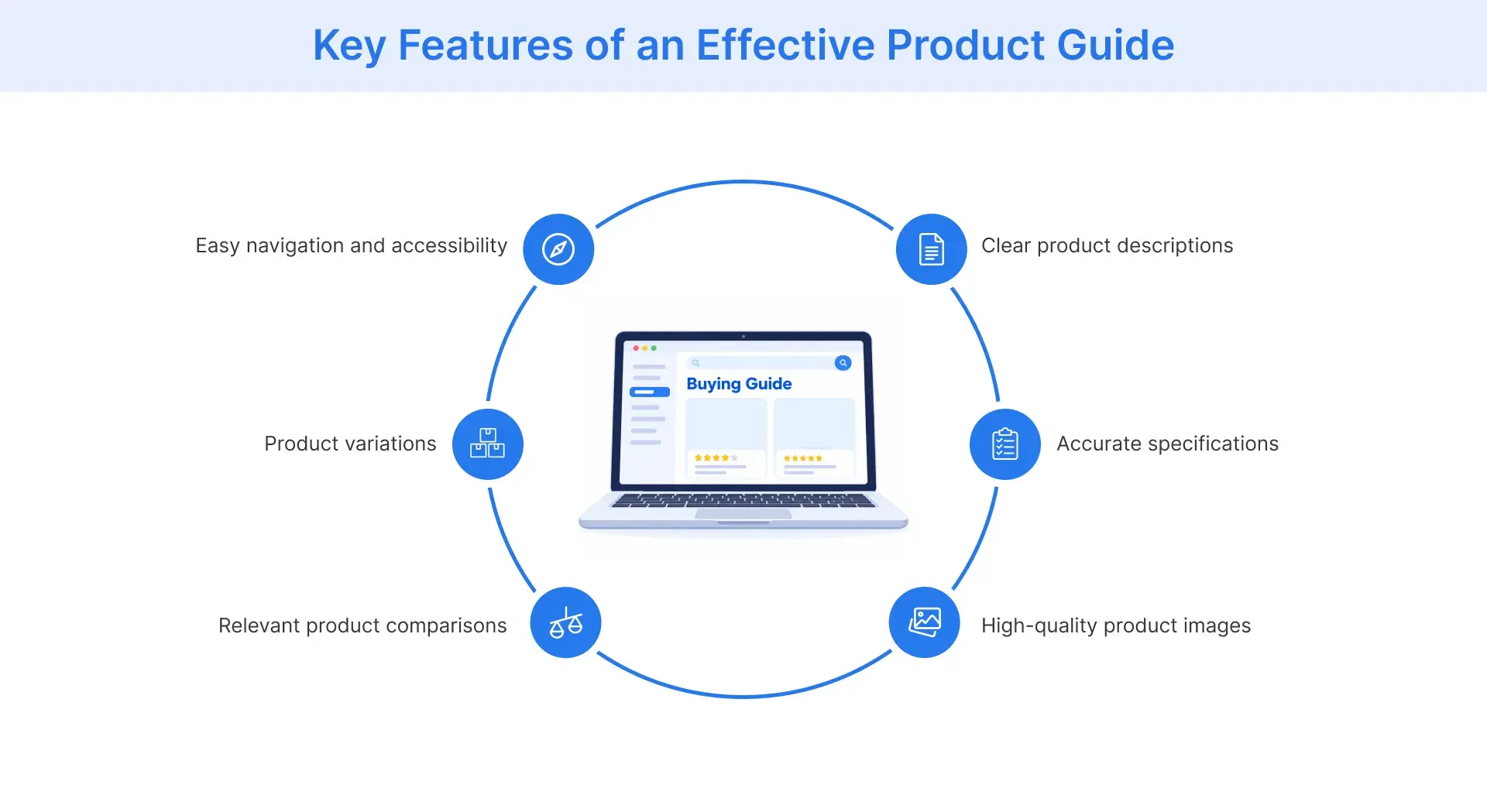
What Are the Key Features of an Effective Product Guide?
An effective product guide presents accurate, relevant information in a format that helps shoppers understand products, compare available options, and make purchasing decisions. The most useful guides combine detailed product information with clear organization and straightforward navigation.
Key features include:
- Clear product descriptions: Explain what each product does, its intended use, and the characteristics that distinguish it from similar options. This helps shoppers understand whether a product meets their needs without relying solely on promotional descriptions.
- Accurate product specifications: Include relevant technical details such as dimensions, materials, compatibility, capacity, or performance specifications. Reliable information allows customers to assess practical requirements and avoid choosing unsuitable products.
- High-quality product images: Show several angles of each product, including important details and variations where applicable. For products such as furniture or apparel, images that communicate size, texture, or fit can help shoppers evaluate characteristics that written descriptions alone may not convey.
- Intuitive organization: Arrange information using descriptive headings, logical categories, and clearly labeled sections. A well-organized product guide helps shoppers find the details they need without searching through unrelated information.
- Relevant product comparisons: Present meaningful differences between products, such as specifications, features, ease of use, intended uses, and prices. Comparison tables can make these differences easier to evaluate, particularly when shoppers are choosing between similar products.
- Information about product variations: Clearly identify product variations, including different colors, sizes, materials, and configurations that affect suitability. This helps customers understand their choices and distinguish between variations of the same product.
- Accessible content and useful navigation: Use understandable language, readable text, descriptive image alternatives, and navigation that works across devices. Include links to relevant product pages so shoppers can check current product details, availability, and purchasing options.
Together, these features help product guides serve as practical buying resources rather than collections of product descriptions. Their effectiveness depends on presenting the information shoppers need in a clear, accurate, and accessible way.
Why Are Product Guides Important for Ecommerce Retailers?
Product guides are important for ecommerce retailers because they help shoppers discover suitable products, evaluate their options, and make purchasing decisions with greater confidence. By addressing common buying questions, these resources can improve the customer experience while supporting retailers’ commercial goals.
The key benefits include:
- Improved product discovery: Product guides help shoppers explore relevant options based on their needs rather than browsing an entire product assortment. For retailers with extensive catalogs, this can make it easier for customers to identify products worth considering.
- Reduced purchasing uncertainty: Buying advice and meaningful comparisons help customers understand differences in product features, specifications, and suitability. This is particularly valuable when shoppers are unfamiliar with a product category or deciding between similar options.
- Greater customer confidence: Clear explanations of what products offer, including their intended uses and limitations, help shoppers assess whether an item meets their expectations. Customers can make more informed decisions when they understand what they are purchasing.
- Better engagement with product information: Relevant guides give shoppers opportunities to explore buying criteria, compare alternatives, and learn about products before visiting individual product pages. This can encourage more purposeful engagement with an ecommerce store.
- Opportunities to encourage purchases: When shoppers can identify suitable products and access the relevant purchasing information, they may be more willing to complete a purchase. Product guides can therefore support conversion efforts, although their impact depends on factors such as product relevance, pricing, availability, and the overall shopping experience.
For retailers, the value of product guides extends beyond presenting information. They help connect customer needs with suitable products, making the buying journey easier to navigate while creating opportunities for more informed purchasing decisions.
What Are Some Examples of Product Guides in Ecommerce?
Product guides help shoppers make practical buying decisions across different retail categories. The information they provide depends on the products being considered and the factors customers need to evaluate before purchasing.
Here are three examples of how ecommerce retailers can use product guides:
- Furniture retailer’s mattress size buying guide: A furniture retailer may create a guide comparing mattress sizes, dimensions, and recommended room space. A customer choosing between a double, queen, or king-size mattress can use this information to assess available bedroom space, sleeping preferences, and bed frame compatibility before selecting a suitable option.
- Electronics retailer’s laptop buying guide: An electronics retailer may explain laptop specifications such as processor type, RAM, storage capacity, battery life, and display size. By connecting these specifications to common uses, including office work, gaming, or studying, the guide helps shoppers compare different models and identify laptops that meet their performance requirements and budget.
- Apparel retailer’s clothing fit and fabric guide: An apparel retailer may provide sizing charts, garment measurements, fabric composition, and explanations of different clothing fits. A shopper looking for comfortable clothing in warm weather, for example, can compare material properties and fit options to choose garments suited to their preferences and intended use.
These examples show how product guides can address specific purchasing questions. Rather than presenting product information in isolation, they connect relevant details to the decisions shoppers need to make.
How Can Retailers Create Effective Product Guides?
Retailers can create effective product guides by understanding their customers’ purchasing questions, selecting relevant products, and presenting accurate information that helps shoppers compare their options. These best practices also include making guides easy to navigate, updating them regularly, and evaluating how customers use them.
The following key steps can help retailers develop product guides that support purchasing decisions.
1. Identify the questions customers need answered.
Review onsite search queries and gather feedback through customer reviews and support inquiries to understand what shoppers want to know before purchasing. Look for recurring questions across different user segments, including first-time buyers and experienced customers, about product suitability, compatibility, sizing, specifications, or price differences. Prioritize questions that directly influence how customers compare and select products.
2. Select products that match the guide’s purpose.
Choose products based on the needs and purchasing decisions the guide will address. For example, a guide for first-time coffee machine buyers might include different machine types suited to varying budgets, kitchen spaces, and brewing preferences. Avoid including unrelated products simply to increase the number of items featured.
3. Organize the content around purchasing decisions.
Choose a guide format that matches the customer’s information needs. A buying guide may begin with important selection criteria, while a comparison guide can organize products around specific attributes. Use descriptive headings, logical sections, and clear navigation so shoppers can move from understanding their requirements to evaluating suitable options.
4. Provide accurate product information and useful visuals.
Gather verified descriptions, specifications, dimensions, compatibility details, and available product variations. Include high-quality images that show relevant product features and differences. Keep terminology and measurement units consistent across products so customers can make meaningful comparisons.
5. Explain product differences and purchasing tradeoffs.
Go beyond listing specifications by explaining how those details affect product suitability. For example, a laptop guide could explain how RAM, processor performance, battery life, and weight matter for different activities. Use comparison tables where appropriate, and identify relevant limitations so shoppers can assess which features matter most to them.
6. Make guides accessible and easy to find.
Use readable text, clear headings, descriptive image alternatives, and layouts that work across mobile and desktop devices. Optimize images to avoid slowing page load times, especially on mobile. Place guides where shoppers are likely to need assistance, such as category pages, relevant product listings, a dedicated landing page, or a buying advice resource center. Include links to matching product pages so customers can check availability, review current details, and proceed toward purchasing.
7. Review and update product information regularly.
Assign responsibility for keeping guides accurate as products, specifications, prices, and availability change. Review the content when new models launch, existing products gain new features, products are discontinued, or buying recommendations become outdated. Update broken links and remove information that no longer reflects the retailer’s available assortment.
8. Measure performance and improve the guide.
Track user behavior through metrics such as guide visits, user engagement, clicks to product pages, additions to cart, and purchases involving guide interactions. Where tracking permits, use funnel analysis to identify where shoppers stop progressing from a guide to product pages or checkout. Compare these findings with customer feedback to investigate low engagement, unclear explanations, or gaps in product coverage. Retailers can then test improvements to content, layout, or product recommendations, rather than assuming that engagement alone proves a guide increases conversions.
Creating an effective product guide is an ongoing process. Retailers should refine their guides as customer needs, product assortments, and purchasing behavior change.
Conclusion
Product guides help ecommerce retailers organize product information into useful buying resources. Through clear descriptions, comparisons, and buying advice, retailers can help shoppers evaluate their options and make informed purchasing decisions.
To create more effective product guides, retailers should:
- Choose guide formats that address specific customer needs and purchasing decisions.
- Provide accurate specifications, clear visuals, and meaningful product comparisons.
- Keep product information updated and review how shoppers engage with their guides.
Flipkart Commerce Cloud helps retailers manage the product information that supports informed purchasing decisions. Its Catalog Management solution enables businesses to organize product attributes, manage rich media, and maintain catalog data quality.
Book a demo to explore how FCC can help your business deliver more reliable product information and support better shopping experiences.

FAQ
A product guide helps shoppers compare options and decide what to buy, while a user manual provides clear instructions for setting up, operating, and maintaining a product. Product guides primarily support purchasing decisions, whereas user manuals are product documentation designed mainly for customers who already own the product.
Product guides differ from product descriptions in their depth and scope. Product descriptions typically provide features, specifications, and other details about individual items on catalog listings or product pages. Product guides offer broader buying advice, comparisons, and selection criteria to help shoppers evaluate different products and choose suitable options.
Ecommerce retailers should update product guides whenever product specifications, availability, or buying recommendations change. Regular reviews also help identify outdated information and links. Quarterly reviews may be useful for some product categories, but the appropriate frequency depends on how often products and customer needs change.
Yes, small ecommerce stores can benefit from product guides by answering common buying questions, explaining product differences, and helping customers choose suitable options. Publishing useful buying advice on an ecommerce site can support product discovery, build customer confidence, and potentially reduce repetitive questions directed to customer support teams.
Retailers can localize product guides for international shoppers by adapting translations, currencies, measurement units, and regional sizing charts. They should also consider local product availability, buying preferences, and cultural expectations. This helps retailers provide relevant purchasing guidance for different audiences while maintaining consistent product information across markets.