
October 23, 2026
Conversion Audits and the Ecommerce Customer Journey
A conversion audit is a structured evaluation of an ecommerce website to identify issues that may prevent visitors from completing purchases or other desired actions. It examines customer behavior, website usability, product pages, and checkout processes to help retailers identify conversion barriers and prioritize improvements.
Drishti, Manager - Digital Marketing

Table of Contents
- What Is a Conversion Audit?
- Why Are Conversion Audits Important for Ecommerce Retailers?
- When Should Retailers Conduct a Conversion Audit?
- What Areas of an Ecommerce Website Does a Conversion Audit Examine?
- What Data and Tools Are Used in a Conversion Audit?
- How Can Retailers Conduct a Conversion Audit?
- What Does a Conversion Audit Look Like in Practice?
- What Should Retailers Do After a Conversion Audit?
- Conclusion
Conversion Audits and the Ecommerce Customer Journey
Ecommerce retailers can attract website visitors and still lose potential sales. Shoppers may leave when product pages lack essential information, cart interactions become confusing, or the checkout process introduces unexpected obstacles. Understanding where potential customers drop off and what influences their decisions is an important part of improving the customer journey. A conversion audit helps retailers investigate these issues and identify where improvements may be needed.
What Is a Conversion Audit?
A conversion audit, also called a conversion rate optimization (CRO) audit, is a structured evaluation of an ecommerce website's customer journey to identify usability problems, technical issues, and other friction points that may prevent visitors from completing a desired action.
For ecommerce retailers, a conversion typically means a completed purchase, although other conversion goals may include account registrations or newsletter sign-ups.
A CRO audit focuses on identifying potential barriers through website performance and customer behavior data. Implementing and testing changes to improve the conversion rate is a separate step that follows the audit.
Why Are Conversion Audits Important for Ecommerce Retailers?
Conversion audits help ecommerce retailers understand why website visitors may leave without purchasing and where improvements could make the customer journey easier. By examining customer behavior and website analytics, retailers can identify potential problems and make decisions based on evidence rather than assumptions.
The main benefits include:
- Identifying conversion barriers: An audit can reveal friction points that discourage purchases, such as confusing navigation, incomplete product information, or difficulties during checkout.
- Understanding customer behavior: Reviewing conversion metrics and user interactions helps retailers recognize where shoppers lose interest, abandon their carts, or struggle to complete a desired action.
- Prioritizing website improvements: Audit findings help retailers identify which issues deserve attention based on their potential impact on the customer journey and business goals.
- Improving the customer experience: Addressing usability problems and unnecessary purchasing obstacles can make it easier for customers to browse products, evaluate options, and complete transactions.
A conversion audit provides a starting point for informed improvements. Retailers still need to implement and test changes to determine whether they improve conversion rates or overall website performance.
When Should Retailers Conduct a Conversion Audit?
Retailers should consider a conversion audit when website performance changes unexpectedly or customers encounter difficulties completing purchases. Audits are also useful before major ecommerce initiatives, even when conversion rates appear stable.
Common situations that may warrant an audit include:
- Declining conversion rates: A sustained drop in completed purchases may indicate problems with product discovery, website usability, or the checkout process that require investigation.
- High cart abandonment: When shoppers regularly add products to their carts but leave without purchasing, an audit can help identify potential friction points, such as unexpected charges or a complicated checkout flow.
- Differences in mobile and desktop performance: If visitors using mobile devices convert at significantly lower rates than desktop users, retailers may need to examine mobile navigation, page responsiveness, and checkout usability.
- Major website changes: Redesigns, platform migrations, new checkout features, or changes to product pages can affect the customer journey. Conducting an audit after these updates helps retailers identify potential issues.
Retailers can also conduct conversion audits before major campaigns or website investments to establish a performance baseline. Periodic reviews help businesses identify emerging issues as customer expectations, traffic sources, and website requirements change.
What Areas of an Ecommerce Website Does a Conversion Audit Examine?
A conversion audit examines different stages of an ecommerce website to identify issues that may prevent customers from completing purchases. Whether visitors arrive on a landing page, browse products, or proceed to checkout, they may encounter obstacles that affect their shopping experience.
Ecommerce Conversion Audit Checklist |
||
|---|---|---|
|
Website Area |
What the Audit Examines |
Potential Conversion Barriers |
|
Homepage and navigation |
Menu structure, category access, and pathways to products |
Confusing menus or difficulty finding relevant products |
|
Product category pages |
Product organization, filters, and sorting options |
Poor categorization or filters that make product discovery difficult |
|
On-site search |
Search relevance, autocomplete, and search results |
Irrelevant results or unsuccessful product searches |
|
Product detail pages |
Product descriptions, images, pricing, availability, and purchase options |
Missing information, unclear pricing, or confusing purchase buttons |
|
Cart and checkout |
Cart interactions, form fields, shipping costs, payment options, and checkout flow |
Unexpected charges, payment failures, or complicated checkout steps |
|
Mobile usability |
Navigation, responsiveness, and purchasing experience on mobile devices |
Difficult-to-use forms, crowded layouts, or unresponsive buttons |
|
Website performance |
Page speed, technical errors, and overall site stability |
Slow-loading pages, broken functionality, or failed transactions |
Reviewing these areas helps retailers identify potential conversion barriers at different stages of the customer journey. The findings can then guide further investigation into the issues that may be affecting website performance.
What Data and Tools Are Used in a Conversion Audit?
A conversion audit combines website analytics with research into how customers interact with an ecommerce store. Retailers use quantitative data to identify where visitors abandon their shopping journey and qualitative evidence to investigate what may be causing those difficulties.
The main data sources and tools include:
- Website analytics: Platforms such as Google Analytics 4 (GA4) provide conversion rates, traffic sources, and customer journey data. Retailers can examine performance across devices, channels, and pages to identify unusual patterns.
- Conversion funnel data: Funnel reports show how visitors progress through stages such as product views, adding items to carts, and completing checkout. Drop-off rates and cart abandonment metrics help identify where potential customers leave.
- Heatmaps and session recordings: Heatmaps show patterns in clicks, scrolling, and interactions, while session recordings allow retailers to observe individual browsing sessions. These tools can reveal confusing layouts or areas where visitors struggle to interact with a page.
- Usability testing: Observing shoppers as they complete tasks and collecting user feedback can help retailers understand confusing interfaces, unmet expectations, and other difficulties affecting the customer experience.
- Customer surveys and feedback: Surveys, feedback forms, and customer comments can provide context about purchasing difficulties, missing information, or concerns that influence checkout decisions.
Quantitative data helps retailers identify where conversion problems may occur, while qualitative research provides clues about why. Both require careful interpretation, as observed behavior alone does not prove what caused a customer to abandon a purchase.
How Can Retailers Conduct a Conversion Audit?
Retailers can conduct a conversion audit by systematically examining how customers move through their ecommerce website, where they encounter difficulties, and which issues may require attention. The following steps outline the audit process.
-
Define the audit objectives. Establish what the business wants to investigate, such as declining purchase conversions, high cart abandonment, or poor mobile performance. Set a clear scope to keep the audit focused on relevant customer actions.
-
Map the customer journey and establish baseline metrics. Identify the stages customers pass through, from product discovery to checkout. Record key metrics such as conversion rates and funnel drop-off rates to establish a performance baseline.
-
Analyze quantitative data. Use website analytics to examine traffic patterns, customer behavior, and conversion funnel performance. Compare results across devices, traffic sources, and purchasing stages to identify where customers may be encountering problems.
-
Investigate qualitative evidence. Review heatmaps, session recordings, usability testing findings, and customer feedback to understand possible reasons behind the observed behavior. Look for recurring difficulties rather than relying on isolated interactions.
-
Assess and prioritize potential barriers. Compare findings across data sources to identify issues supported by evidence. Prioritize them based on their frequency, potential impact on conversions, and relevance to business objectives.
-
Develop recommendations for testing. Document the findings and propose specific improvements or testable hypotheses. Identify the changes that require further validation before retailers commit to implementing them.
The completed audit should give retailers a prioritized set of findings and recommendations. Testing and implementing the proposed changes are separate activities that follow the investigation.
What Does a Conversion Audit Look Like in Practice?
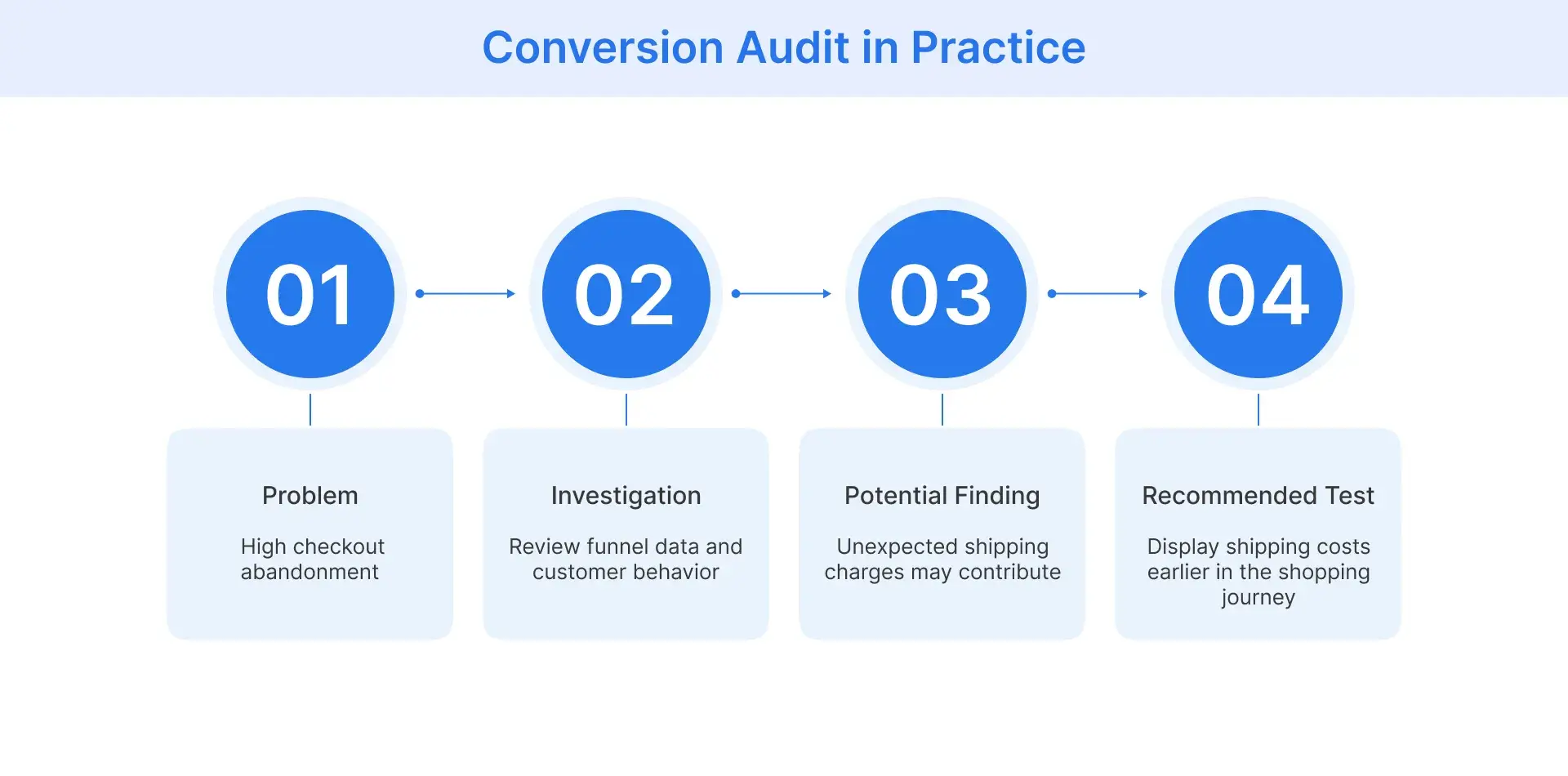
Consider a hypothetical homeware retailer experiencing high checkout abandonment despite customers regularly adding products to their carts. The retailer conducts a conversion audit to investigate why shoppers leave before completing their purchases.
Website analytics reveal that a significant number of customers exit during the shipping stage of checkout. The retailer then reviews session recordings and customer feedback, which suggest that unexpected delivery charges may be contributing to these exits.
Based on these findings, the retailer recommends testing whether displaying estimated shipping costs earlier in the shopping journey could reduce checkout abandonment.
The audit identifies a potential conversion barrier and provides a basis for further testing. It does not establish that shipping charges are the only cause or guarantee that the proposed change will improve conversions.
What Should Retailers Do After a Conversion Audit?
After completing a conversion audit, retailers should turn their findings into an improvement plan that addresses identified problems and tests potential solutions. Not every recommendation requires the same approach, so the next steps should reflect the nature and urgency of each issue.
-
Create a prioritized improvement plan. Organize audit findings by their potential impact on conversions, severity, and implementation effort. Assign responsibilities and establish clear performance goals for each proposed change.
-
Resolve confirmed technical issues. Address problems such as broken checkout buttons, payment errors, or malfunctioning forms. Verify that the fixes work across relevant devices and browsers before evaluating their effect on conversion performance.
-
Test proposed experience improvements. Use usability testing to assess whether changes make the website easier to navigate. For alternatives such as checkout layouts or shipping-cost displays, A/B testing can help retailers compare performance before adopting a change more widely.
-
Measure results and continue monitoring. Compare conversion rates, cart abandonment, and other relevant metrics against the established baseline. Monitor performance across customer segments and devices to determine whether improvements are sustained or further investigation is needed.
Conversion rate optimization is an ongoing process. Retailers should use the results of implemented changes to refine their decisions and continue identifying opportunities to improve the customer journey.
Conclusion
A conversion audit helps retailers understand where customers encounter purchasing difficulties and identify improvements worth investigating.
To get meaningful results, retailers should:
- Examine customer behavior: Use quantitative and qualitative evidence to identify potential conversion barriers.
- Prioritize improvements: Focus on issues supported by evidence and their potential business impact.
- Test and monitor changes: Measure results against baseline metrics before expanding improvements.
Flipkart Commerce Cloud helps retailers improve the ecommerce purchasing experience by providing tools to streamline cart and checkout operations.
Its Cart and Checkout software supports conversion tracking, checkout error management, and cart performance monitoring, helping retailers identify optimization opportunities.
Book a demo to explore how FCC can help your team monitor checkout performance and improve the customer purchasing experience.

FAQ
To calculate a website’s conversion rate, divide the number of sessions resulting in a purchase by total sessions during the same period, then multiply by 100. For example, 60 purchasing sessions out of 2,000 sessions equal 3%. Site visitors are a separate measure and should not be mixed with sessions.
A 6% conversion rate can be strong for an ecommerce site, but results vary by industry, traffic source, and customer mix. It may suggest good user engagement, although the number alone cannot prove that web pages are optimized, customer satisfaction is high, or the checkout page is friction-free.
Some ecommerce conversion audits take one to three weeks, but there is no fixed timeline. Duration depends on site complexity, audit scope, and data availability. Reviewing analytics data, user behavior, user testing results, and friction points behind shopping cart abandonment may require additional time.
Yes, retailers can conduct a conversion rate optimization audit without paid tools by using free analytics platforms and self-directed heuristic evaluations. Merchants can examine sales funnels, review qualitative user data, inspect mobile checkout flows, and identify user experience issues that may affect conversions and revenue.
Yes, a low-traffic ecommerce business can benefit from a conversion audit. Reviewing navigation friction, the value proposition, and audience pain points can reveal opportunities to improve the customer journey. However, with fewer visitors, retailers may need more time and evidence to assess whether changes improve conversions.