
October 23, 2026
Horizontal Scrolling and Usability in Ecommerce
Horizontal scrolling is a navigation method that allows users to move left or right to view content beyond the visible area of a webpage or section. Ecommerce websites use it for product galleries, recommendations, and category carousels to organize visual content, although poor implementation can make navigation difficult and important information harder to discover.
Drishti, Manager - Digital Marketing

Table of Contents
- What Is Horizontal Scrolling?
- How Does Horizontal Scrolling Work?
- What Is an Example of Horizontal Scrolling in Ecommerce?
- What Is the Difference Between Horizontal and Vertical Scrolling?
- Where Is Horizontal Scrolling Used on Ecommerce Websites?
- What Are the Benefits of Horizontal Scrolling for Ecommerce Websites?
- What Are the Drawbacks of Horizontal Scrolling?
- When Should Ecommerce Websites Use Horizontal Scrolling?
- How Can Retailers Make Horizontal Scrolling More User-Friendly?
- Conclusion
Horizontal Scrolling and Usability in Ecommerce
Ecommerce websites need to display product images, recommendations, categories, and promotional content without overwhelming shoppers, especially on smaller screens. Horizontal scrolling offers a way to present additional content within limited space, but its effectiveness depends on how easily visitors can navigate and discover information. Understanding its applications, benefits, limitations, and usability considerations helps retailers create a more intuitive shopping experience.
What Is Horizontal Scrolling?
Horizontal scrolling is a navigation method that allows users to move left or right to view content extending beyond the visible area of a webpage or section. Unlike traditional vertical scrolling, which moves content up and down, horizontal scrolling presents additional information in a sideways arrangement.
On ecommerce websites, horizontal scrolling is commonly used in product image galleries, product listings, and category collections. It allows shoppers to browse additional items within a section without navigating away from the current page.
How Does Horizontal Scrolling Work?
Horizontal scrolling works by allowing users to move through content arranged side by side within a webpage or a specific section. When the content extends beyond the visible area, users can scroll left or right to reveal additional items.
Different horizontal scrolling methods are available depending on the device and website design. On mobile devices, shoppers typically swipe across the screen, while desktop users may navigate using trackpad gestures, horizontal scrollbars, or left and right arrow buttons.
For example, an ecommerce product page may display a row of recommended products. Shoppers can scroll horizontally to explore more recommendations while the rest of the webpage remains in place. This allows retailers to present additional content without requiring visitors to open another page.
What Is an Example of Horizontal Scrolling in Ecommerce?
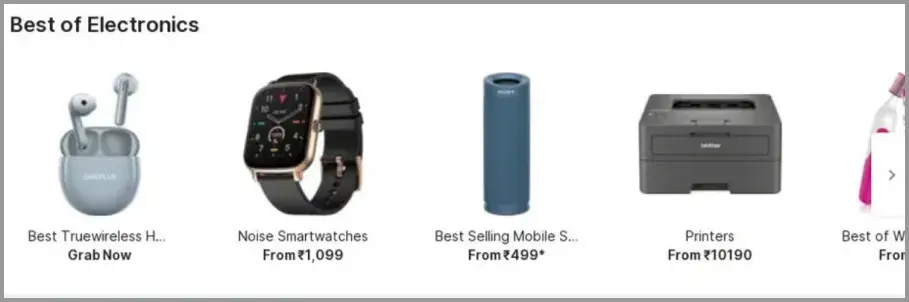
Flipkart's “Best of Electronics” product collection provides a practical example of horizontal scrolling on an ecommerce website. The section displays products such as wireless earbuds, smartwatches, speakers, and printers side by side, with a right-arrow button indicating that shoppers can explore additional items.
This arrangement allows customers to browse more products within the same section rather than moving through a long vertical list. It also helps retailers present multiple product options within limited screen space while keeping shoppers on the current page.
What Is the Difference Between Horizontal and Vertical Scrolling?
The main difference between horizontal and vertical scrolling is the direction in which users navigate content. Horizontal scrolling reveals information positioned to the left or right, while vertical scrolling allows users to move up or down a webpage.
Both methods help users access content beyond the visible screen, but they serve different purposes in ecommerce website design.
|
Horizontal vs. Vertical Scrolling |
||
|---|---|---|
|
Aspect |
Horizontal Scrolling |
Vertical Scrolling |
|
Navigation direction |
Moves content left or right |
Moves content up or down |
|
Common applications |
Product galleries, recommendation rows, and category carousels |
Product listings, descriptions, and general webpage content |
|
User interactions |
Touchscreen swipes, trackpad gestures, scrollbars, or directional buttons |
Mouse wheels, touchscreen swipes, trackpads, or vertical scrollbars |
|
Content visibility |
Additional items appear beyond the left or right edge of a section |
Additional content appears above or below the visible area |
|
Typical website layout |
Usually applied to individual content sections |
Commonly used for navigating entire webpages |
Vertical scrolling remains the default page navigation method for most ecommerce webpages because it supports continuous reading and browsing. Horizontal scrolling is better suited to selected components where shoppers can explore related products or images without leaving their current position on the page.
Where Is Horizontal Scrolling Used on Ecommerce Websites?
Horizontal scrolling can appear on an ecommerce homepage, landing page, or product page where retailers need to display related products, images, or promotions within limited screen space.
Common applications include:
- Product image galleries: Shoppers can swipe through multiple images of a product to examine different angles, colors, or features without leaving the product detail page.
- Recommended product collections: Retailers can arrange similar or complementary products in a horizontal row, allowing shoppers to browse additional recommendations while staying on the current page.
- Category carousels: Ecommerce homepages may display categories such as electronics, fashion, and homeware side by side. Shoppers can scroll horizontally to explore more categories.
- Promotional displays: Retailers can organize seasonal offers, featured campaigns, or discount banners in horizontally navigable sections, allowing customers to view multiple promotions.
- Visual product showcases: Curated collections, such as seasonal fashion looks or home decor inspiration, can use horizontal layouts to help shoppers explore related products visually.
Although these applications may look similar, not every horizontally scrollable section is a carousel. A carousel is a specific interface pattern that presents a sequence of items or panels, often with navigation controls, while other sections allow users to scroll freely through content.
What Are the Benefits of Horizontal Scrolling for Ecommerce Websites?
Horizontal scrolling can help ecommerce retailers organize visually rich content and provide additional browsing options without extending the entire page. When implemented appropriately, it offers several potential benefits:
- Makes better use of limited screen space. Retailers can display a selection of products within a scrollable container while allowing shoppers to access additional content by moving sideways. This is particularly useful for product collections on smaller screens.
- Supports product discovery. Horizontally arranged recommendations allow shoppers to explore similar or complementary products without leaving the current page. This can make related product options easier to browse.
- Improves visual presentation. Product galleries and curated collections allow retailers to showcase images, product variations, and complementary items in a visually organized format. Horizontal layouts can also support visual storytelling through themed product collections.
- Keeps related content organized. Categories, featured products, and promotional offers can be grouped into separate horizontally scrollable sections, reducing the need for lengthy vertical lists while preserving the page’s overall structure.
- Supports touch-based browsing on mobile devices. Mobile users can swipe through product images and collections using familiar gestures. When combined with responsive design and clear navigation cues, this can contribute to a more intuitive scrolling experience.
These advantages depend on thoughtful website design. Horizontal scrolling is most useful when shoppers can recognize that additional items are available and navigate them without unnecessary effort.
What Are the Drawbacks of Horizontal Scrolling?
Although horizontal scrolling can help retailers organize product collections and visual content, poor implementation can make ecommerce websites harder to navigate. Common drawbacks include:
- Hidden content: Products: promotions, or important information positioned outside the visible area may go unnoticed, especially when shoppers do not realize they can scroll sideways.
- Unclear navigation controls: Without visible arrows, partial product previews, or a horizontal scroll bar, shoppers may struggle to discover additional content. This can make browsing less intuitive.
- Difficult desktop interactions: Desktop users typically rely on a mouse scroll wheel for vertical navigation. Exploring horizontal content may require additional effort when directional buttons or other controls are not clearly available.
- Interruptions to normal browsing: Horizontal scrolling sections can interfere with vertical page navigation if touch gestures or scrolling behavior are poorly configured. Shoppers may accidentally move sideways when they intend to continue down the page.
- Accessibility and responsive design challenges: Poorly implemented sections may be difficult to navigate using a keyboard or assistive technology. Layouts that do not adapt properly to different screen sizes can also create unwanted horizontal scrolling, particularly for mobile users.
It is important to distinguish intentional horizontal scrolling within a product gallery or carousel from unintended sideways movement across the full web page. The former can support browsing, while the latter often signals a layout problem that retailers need to address.
When Should Ecommerce Websites Use Horizontal Scrolling?
Ecommerce websites should use horizontal scrolling when it makes browsing visual content easier without hiding information shoppers need to complete a purchase. The decision should depend on the type of content, the shopper’s task, and the overall user experience.
Horizontal scrolling is particularly suitable for:
- Product image galleries: Shoppers can swipe through different product angles, colors, or variations within a dedicated section.
- Supplementary product recommendations: Retailers can display related or complementary products in a horizontal row while keeping the main product information visible.
- Collections of closely related items: Categories, seasonal collections, or featured products can be arranged side by side when shoppers benefit from exploring them visually.
However, the use of horizontal scrolling may be less appropriate for essential website navigation, lengthy product descriptions, shipping policies, or important purchasing information. These elements should remain easy to find without requiring shoppers to discover hidden content.
Horizontal layouts can also make product comparisons difficult when customers need to view several specifications or options simultaneously. In such cases, a conventional vertical layout or a dedicated comparison table may provide a clearer experience.
Before introducing horizontal scrolling, retailers should consider whether it helps shoppers complete a specific task more easily than vertical scrolling. If sideways navigation creates unnecessary effort or reduces content visibility, a vertical layout is likely the better choice.
How Can Retailers Make Horizontal Scrolling More User-Friendly?
Thoughtful UI design can improve the user experience of horizontal scrolling by making navigation easy to discover, accessible, and consistent across devices. The following practices can help shoppers interact with horizontally scrollable content more effectively:
-
Make navigation controls clearly visible. Use recognizable left and right arrows or other visual cues to indicate that shoppers can move sideways. Avoid relying entirely on gestures that may not be obvious to every visitor.
-
Show a preview of additional content. Allow part of the next product card or image to remain visible at the edge of a scrollable container. This helps shoppers recognize that more items are available beyond the current view.
-
Support intuitive mobile interactions. Enable smooth swipe gestures for mobile users while ensuring that horizontal scrolling does not interfere with normal vertical page navigation.
-
Make scrolling accessible through a keyboard. Ensure navigation buttons can be reached and operated using a keyboard. Where appropriate, support arrow keys so shoppers who cannot use a mouse or touchscreen can explore the content.
-
Apply responsive design across devices. Adjust product card sizes, spacing, and navigation controls for different screen sizes. A layout that works on a desktop should remain usable on tablets and mobile devices without causing unwanted scrolling across the entire page.
-
Test the experience with real users. Evaluate the scrolling feature across various devices, focusing on specific devices commonly used by your shoppers. Observe whether they notice navigation controls, discover additional content, and interact with product collections as intended.
Effective horizontal navigation should make browsing easier rather than introduce additional effort. Retailers should prioritize clear controls, accessible interactions, and consistent functionality so that the scrolling experience supports shoppers’ needs.
Conclusion
Horizontal scrolling can make ecommerce browsing more intuitive when it is used selectively for product galleries, recommendations, and other visually related content. Its effectiveness depends on whether shoppers can easily discover and navigate items beyond the visible screen.
Key takeaways for retailers include:
-
Use horizontal scrolling purposefully. Reserve it for content that benefits from sideways exploration rather than replacing conventional vertical navigation.
-
Prioritize visibility and accessibility. Provide clear navigation controls, keyboard support, and responsive layouts that work across devices.
-
Test the shopping experience. Observe how shoppers interact with horizontal sections to identify hidden content, navigation difficulties, and opportunities for improvement.
For retailers developing adaptable ecommerce experiences, Flipkart Commerce Cloud offers its Composable Storefront, a modular solution for building and evolving online storefronts. This gives retailers greater flexibility to refine product galleries, recommendations, and other browsing experiences as their needs change.

FAQ
Unwanted horizontal scrolling on mobile websites typically occurs when oversized images, fixed-width elements, or containers extend beyond the screen. These web design issues can disrupt responsive layouts across different devices, causing the entire page to move sideways when shoppers intend to scroll vertically.
Yes, ecommerce web pages can combine horizontal and vertical scrolling. While the main page navigation moves vertically, horizontal scrolling can be used within product galleries, recommendation sections, and category carousels. This allows shoppers to explore different categories or products sideways without changing how they navigate the rest of the page.
Scroll snapping is a web design feature that automatically aligns content to predefined positions within a scrollable container. When shoppers swipe through a horizontal product gallery, scroll snapping can position each product card neatly within the visible area, preventing the content from stopping at awkward points between items.
Retailers can measure carousel usage by tracking interactions such as arrow clicks, swipe gestures, and product clicks through analytics events. Comparing carousel impressions with product clicks helps calculate click-through rates, while subsequent product views or purchases provide additional context. These events may require configuration within the retailer’s analytics tools.