
November 21, 2026
Shopping Cart in Ecommerce: How It Works and What Makes It Effective
A shopping cart in ecommerce is a digital tool that allows customers to select, review, and manage products before completing a purchase. It keeps track of items, quantities, prices, and applicable charges, helping shoppers review their selections before proceeding to checkout.
Drishti, Manager - Digital Marketing

Table of Contents
- What Is a Shopping Cart?
- How Does a Shopping Cart Work in Ecommerce?
- What Are the Key Features of an Ecommerce Shopping Cart?
- What Are the Different Types of Ecommerce Shopping Carts?
- What Is the Difference Between a Shopping Cart and Checkout?
- How Can Retailers Improve the Shopping Cart Experience?
- How Can Retailers Reduce Shopping Cart Abandonment?
- Conclusion
Shopping Cart in Ecommerce: How It Works and What Makes It Effective
Finding the right products doesn’t always lead to a completed purchase. If shoppers struggle to update quantities, review prices, or understand additional charges, they may leave an online store before reaching checkout.
For retailers, shopping cart functionality plays an important role in the online shopping experience. A well-designed cart makes it easier for customers to review their selections and proceed with a purchase.
This article explains how ecommerce shopping carts work, their essential features and types, how they differ from checkout, and how retailers can improve the cart experience and reduce abandonment.
What Is a Shopping Cart?
A shopping cart in ecommerce is a digital tool that allows customers to select, manage, and review products they intend to purchase from an online store. It keeps selected items in one place, allowing shoppers to check their choices and make changes before placing an order.
Unlike a physical shopping trolley, an ecommerce shopping cart is part of an online store’s purchasing system. Its primary function is to hold product selections before checkout, where customers provide shipping information, select a payment method, and complete their purchase.
How Does a Shopping Cart Work in Ecommerce?
When a customer selects a product from an online store, they can add it to their shopping cart with the chosen quantity and product options, such as size or color. The cart records these selections and calculates the subtotal based on the items added.
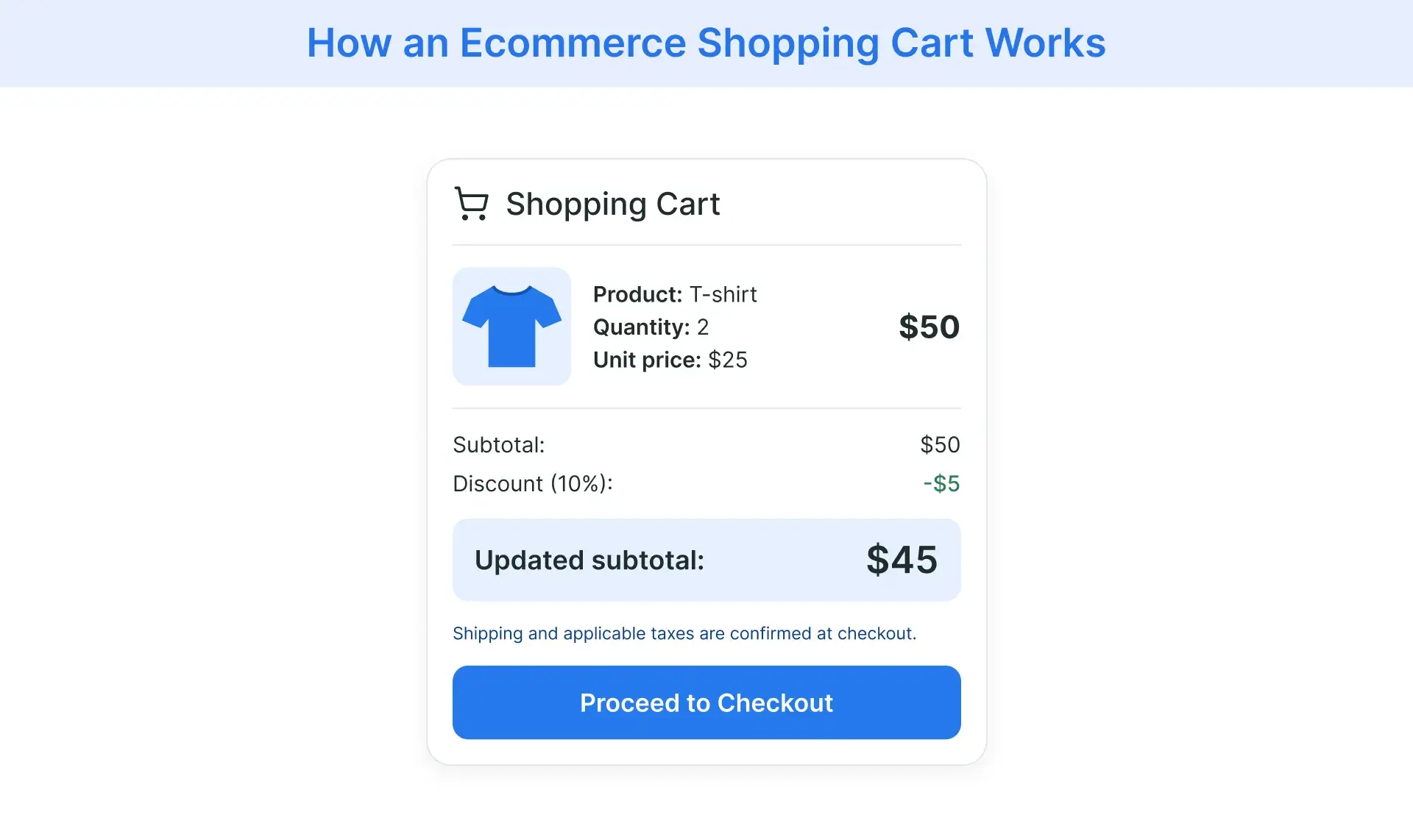
As customers continue shopping, they can adjust quantities or remove products, with the subtotal updating to reflect those changes. The cart may also apply eligible discount codes and display estimated shipping costs or taxes, depending on the retailer’s checkout configuration.
For example, if a shopper adds two T-shirts priced at $25 each, the cart displays a $50 subtotal. Applying a valid 10% discount reduces the merchandise subtotal to $45. The customer can then review the updated amount before proceeding to checkout, where final charges and payment details are confirmed.
What Are the Key Features of an Ecommerce Shopping Cart?
An effective ecommerce shopping cart gives customers the information and controls they need to review their purchases before checkout. Its features should support accurate order calculations, product availability, and a convenient shopping experience.
Key features include:
- Product information: Displays product names, images, selected variants, quantities, and unit prices so customers can verify their selections.
- Cart editing controls: Allows shoppers to change product quantities or remove unwanted items without restarting their shopping session.
- Automatic price calculations: Updates item subtotals and the overall cart value when quantities or prices change, helping customers understand their expected spending.
- Discount code support: Lets customers enter promotional codes and view eligible discounts before completing their purchases.
- Shipping and tax information: Shows applicable charges or estimates where available, helping customers identify additional costs before checkout.
- Mobile-responsive design: Keeps cart information, editing controls, and checkout navigation accessible across smartphones, tablets, and desktop devices.
- Saved cart functionality: Allows shoppers to return to previously selected products, where the retailer supports persistent carts or account-based cart storage.
- Inventory integration: Connects cart functionality with inventory systems to check product availability and help prevent customers from ordering unavailable items. Availability may need to be revalidated at checkout.
- Clear checkout access: Provides a visible, straightforward way to proceed from the cart to the checkout process.
Not every ecommerce platform offers these capabilities by default. Retailers should evaluate shopping cart functionality based on their product catalog, customer needs, and the systems supporting their online store.
What Are the Different Types of Ecommerce Shopping Carts?
Ecommerce shopping cart solutions differ in how they are hosted, maintained, and customized. Retailers can choose software based on their technical resources, operational requirements, and desired level of control.
The main options include:
- Hosted SaaS shopping carts: Cloud-based solutions managed by a third-party provider, typically through a subscription. The provider handles core infrastructure and software updates, while retailers configure their storefront and cart features within the platform’s available options.
- Self-hosted open-source shopping carts: Software whose source code is available for modification under an open-source license. Retailers can customize the cart and control its hosting environment, but they must manage maintenance, security updates, and technical support themselves or through a service provider.
- Commercial licensed shopping carts: Proprietary software offered under a vendor’s licensing agreement. These solutions may support deployment on retailer-managed or vendor-managed infrastructure, with customization options, maintenance responsibilities, and support determined by the agreement.
Headless shopping carts represent a different approach. In a headless commerce architecture, the customer-facing storefront is separated from backend functions, including cart management, which are accessed through APIs. This allows retailers to develop customized shopping experiences across websites, mobile apps, and other digital interfaces.
Unlike the other categories, headless refers to software architecture rather than a hosting or licensing model. A headless shopping cart can therefore be part of a SaaS, open-source, or commercially licensed solution.
What Is the Difference Between a Shopping Cart and Checkout?
A shopping cart and checkout serve different functions in the ecommerce purchasing process. The shopping cart allows customers to review selected products, adjust quantities, and check their subtotal. Checkout handles the steps required to complete the transaction, including providing delivery information, confirming applicable charges, and selecting a payment method.
For example, a customer purchasing a jacket can review its size, quantity, and price in the shopping cart. After proceeding to checkout, they enter their shipping details, review the final order total, and provide payment information. The purchase is complete only when the order is successfully placed and confirmed.
The key distinction is that adding a product to a shopping cart does not constitute a completed purchase. Checkout turns the customer’s selections into an order.
How Can Retailers Improve the Shopping Cart Experience?
Improving the shopping cart experience involves removing obstacles that make it difficult for customers to review their purchases and proceed to checkout. Retailers should focus on making cart information accurate, controls intuitive, and the next steps clear.
Practical improvements include:
- Make pricing transparent. Display item prices, discounts, and an updated subtotal. Show shipping estimates and applicable taxes as early as possible, with clear explanations when final charges depend on the delivery address.
- Simplify cart adjustments. Allow customers to change quantities, remove products, or update product variants without navigating away from the cart unnecessarily. Changes should be reflected immediately in the displayed totals.
- Improve mobile usability. Use readable product details, appropriately sized buttons, and layouts that work on smaller screens. Customers should be able to manage their carts without excessive scrolling or accidental selections.
- Keep checkout navigation clear. Make the checkout button prominent and distinguish it from options to continue shopping. Avoid distracting elements that make the next step difficult to identify.
- Communicate product availability. Notify shoppers when an item is out of stock or its available quantity changes. Where possible, provide clear guidance for adjusting affected cart items before checkout.
- Prevent and resolve technical errors. Test cart updates, discount code validation, and checkout navigation across devices and browsers. Provide specific error messages when an action fails, rather than leaving customers uncertain about their selections.
Retailers can use cart interaction data, customer feedback, and usability testing to identify recurring problems. Addressing these issues can make the purchasing process more reliable and reduce avoidable friction before checkout.
How Can Retailers Reduce Shopping Cart Abandonment?
Not every abandoned shopping cart indicates a problem. Some customers are comparing prices, exploring products, or saving items for a later purchase. However, retailers can take steps to address avoidable abandonment and recover sales from shoppers who leave without completing an order.
Effective approaches include:
- Reduce checkout barriers. Offer guest checkout where appropriate, minimize unnecessary form fields, and provide payment methods suited to the target market. Customers should be able to complete their orders without avoidable registration requirements or complicated payment steps.
- Send abandoned-cart reminders. Use timely email or SMS reminders to help customers return to their unfinished purchases. Include a direct link to the cart and accurate product information, while respecting applicable marketing consent requirements.
- Use targeted retargeting campaigns. Where permitted, retailers can reach shoppers who showed purchase intent through relevant advertisements. Retargeting should reflect product availability and avoid repeatedly promoting items customers have already purchased.
- Monitor abandonment and recovery performance. Track the cart abandonment rate alongside recovered orders and checkout completion data. Reviewing these metrics can help retailers identify where customers disengage and assess whether recovery efforts are effective.
Retailers should also distinguish between shoppers who are not ready to buy and those encountering genuine purchasing obstacles. Addressing the latter can improve the likelihood of completing a sale without relying on unnecessary discounts.
Conclusion
An effective ecommerce shopping cart helps customers move from product selection to checkout with accurate information and fewer purchasing obstacles. For retailers, the priority is to make that transition clear, reliable, and convenient.
Key takeaways include:
- Maintain accurate cart information. Keep product details, quantities, prices, and applicable discounts up to date.
- Prioritize usability. Make cart adjustments straightforward and communicate additional charges before checkout.
- Address cart abandonment. Identify purchasing barriers and use appropriate recovery strategies to encourage order completion.
Flipkart Commerce Cloud supports this process through its Cart and Checkout solution, which brings cart management, pricing calculations, and checkout workflows together to support a more consistent purchasing experience.

FAQ
A shopping cart allows online shoppers to collect multiple products in a virtual shopping basket, adjust quantities, and review their selections before checkout. It also helps customers understand their expected spending by displaying item prices, applicable discounts, and estimated shipping or tax charges where supported.
The difference between a shopping cart and a wishlist lies in their purpose. A shopping cart holds selected products that a customer may purchase and provides a way to proceed to checkout. A wishlist allows potential customers to save products for future consideration, price comparisons, or gift planning without adding them to an active purchase.
Generally, adding a product to an online shopping cart does not reserve inventory. Items may remain available to other shoppers until the retailer’s system allocates or reserves stock during checkout, payment, or order placement. However, reservation rules vary by ecommerce platform, and some retailers temporarily hold inventory during checkout.
There is no universal time limit. Cart persistence depends on the ecommerce platform, retailer settings, and whether the customer is signed in. Guest carts may expire when a browsing session ends or stored browser data is cleared. Account-linked carts can remain available across visits and devices when the platform supports this functionality.
Retailers should track cart abandonment rate, cart-to-detail rate, checkout completion rate, and average order value. These metrics help assess how shoppers progress from product selection to purchase, where they abandon the process, and the value of completed orders. Reviewing the results can help identify potential friction and evaluate improvements.