
July 31, 2026
What Are Wishlists in Ecommerce & How Can Retailers Benefit From Them?
A wishlist is an e-commerce feature that allows shoppers to save products they would like to purchase in the future. Wishlists improve the shopping experience and help retailers understand customer intent, personalize recommendations, recover potential sales, and build stronger customer relationships.
Drishti, Manager - Digital Marketing

Table of Contents
- What Are Wishlists in Ecommerce?
- Why Are Wishlists Important in E-commerce?
- What Are the Benefits of Using Wishlists in E-commerce?
- What Are the Best Practices for Using Wishlists?
- How Should Retailers Measure Wishlist Performance?
- How Can Retailers Monetize Wishlist Data to Drive Revenue?
- How Can Flipkart Commerce Cloud Help Retailers Turn Wishlist Data into Revenue?
What Are Wishlists in Ecommerce & How Can Retailers Benefit From Them?
Ecommerce is as saturated as ever, with millions of products and choices for customers. This leads to longer evaluation periods and frequent comparison shopping. Rather than forcing an immediate "buy now" decision, wishlists bridge the critical gap between casual window shopping and the final checkout.
For consumers, wishlists provide an easy way to curate desired items, track pricing, and organize future purchases. For retailers, this seemingly simple "save for later" feature acts as a powerful data engine. By capturing explicit purchase intent before an item ever hits the shopping cart, wishlists enable brands to reduce cart abandonment rates, deploy highly personalized marketing campaigns, and ultimately transform hesitant browsers into loyal, repeat customers.
In this glossary, ecommerce retailers will learn what wishlists are and exactly how to turn them into a revenue opportunity.
What Are Wishlists in Ecommerce?
A wishlist in e-commerce is a feature that allows shoppers to save products they are interested in purchasing at a later time. Unlike a shopping cart, which is designed for immediate purchases, a wishlist helps customers organize a list of items they want to revisit, compare, or purchase in the future. For retailers, wishlist activity provides valuable first-party data that supports personalized recommendations, targeted marketing campaigns, and stronger customer relationships.
Why Are Wishlists Important in E-commerce?
Wishlists are important in e-commerce because they prevent lost sales from hesitant buyers and serve as a goldmine of first-party data for retailers. By giving shoppers a low-pressure way to save items, wishlists keep your brand in consideration and capture clear purchase intent.
For customers, wishlists simplify product discovery by making it easy to revisit saved items without having to search for them on the online store again. This creates a more seamless shopping experience, especially for shoppers comparing products, waiting for discounts, or planning purchases over time.
For retailers, wishlist activity provides valuable first-party data that reveals customer preferences and shopping intent. These preferences and intentions can be used to deliver personalized product recommendations, trigger price-drop and back-in-stock notifications, and create targeted marketing campaigns that encourage customers to return and complete their purchases. As a result, wishlists contribute to higher customer engagement, improved customer retention, and increased conversion opportunities.
What Are the Benefits of Using Wishlists in E-commerce?
Wishlists create value for both shoppers and retailers by improving the shopping experience while providing valuable insights into customer preferences and purchase intent. Beyond allowing customers to save products for later, wishlists support personalization, strengthen customer engagement, and create more opportunities to convert browsing into purchases.
- Improves customer experience: Wishlists allow shoppers to save products and return to them whenever they are ready to purchase, creating a more convenient and seamless shopping journey.
- Increases customer engagement: Personalized reminders, price-drop alerts, and back-in-stock notifications encourage shoppers to revisit saved products and complete their purchases.
- Generates more sales: Wishlists capture purchase intent by allowing customers to save products for later, giving retailers more opportunities to convert interest into completed purchases.
- Reduces cart abandonment: Customers can save products without feeling pressured to buy immediately, providing an alternative to abandoning their shopping journey.
- Supports personalized marketing: Retailers can use wishlist activity to deliver relevant product recommendations, targeted promotions, and tailored marketing campaigns.
- Provides actionable customer insights: Wishlist data helps retailers understand customer preferences, identify popular products, forecast demand, and make better merchandising decisions.
- Drives traffic and referrals: Shareable wishlists make it easier for customers to recommend products to friends and family, increasing brand visibility and attracting new shoppers.
What Are Some Examples of Wishlists in E-commerce?
Excellent examples of e-commerce wishlists can be seen in top retailers like Flipkart, Walmart, and Noon, which use the feature to organize shopper intent, simplify gift-giving, and track out-of-stock favorites. While implementations vary, these brands successfully use wishlists to secure future purchases and personalize the customer experience.
Flipkart
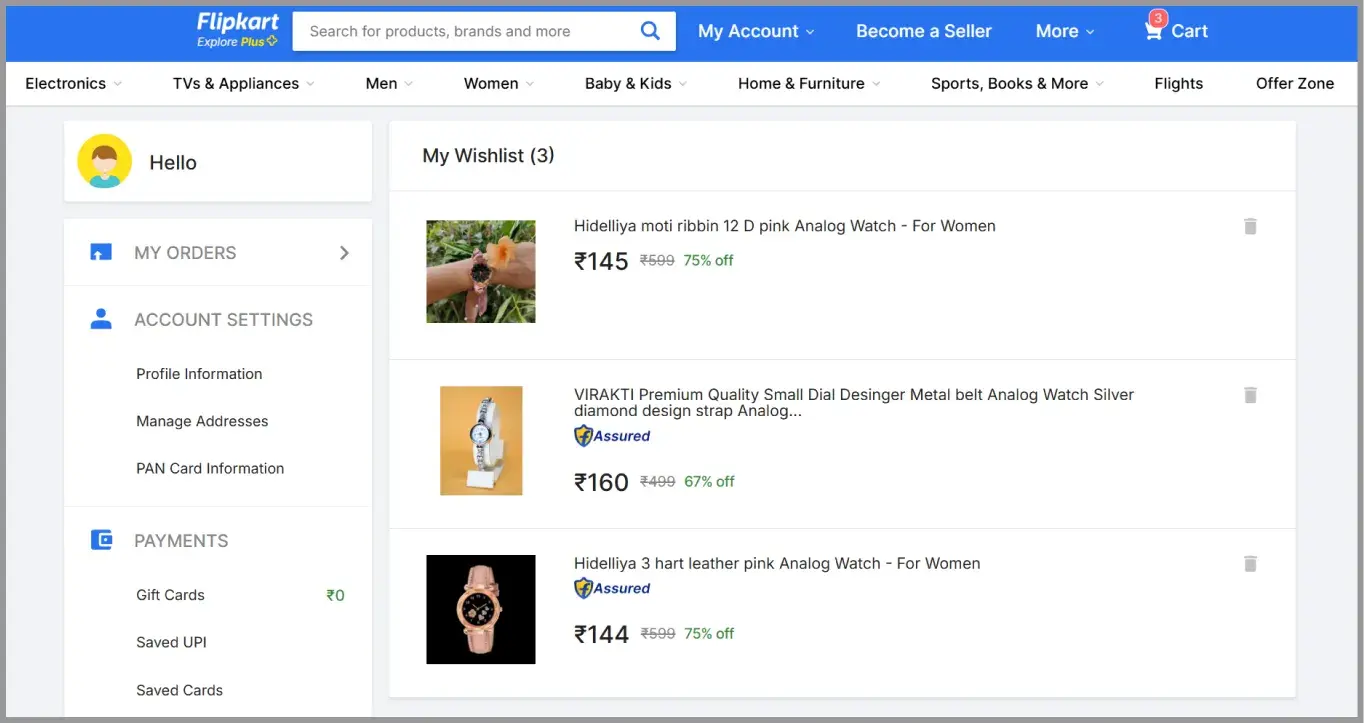
Prominent Indian ecommerce company Flipkart allows shoppers to save desired products to a dedicated "My Wishlist" section, making it easy to track price drops, check product availability, and quickly move items to their cart during major promotional events.
Source: Flipkart
Noon
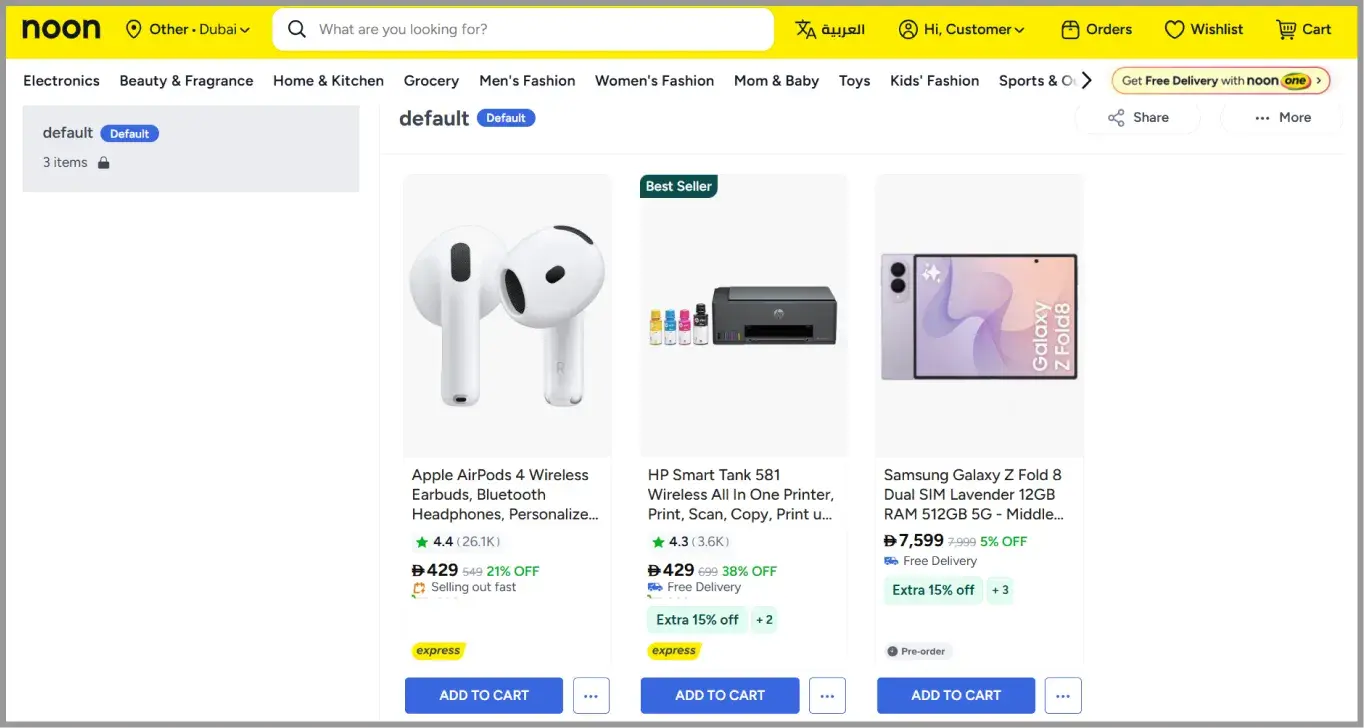
Leading Middle-Eastern ecommerce platform Noon provides a streamlined wishlist feature that lets users bookmark their favorite electronics, fashion, and home goods to quickly monitor stock status and return to preferred items when they are ready to buy.
Source: Noon
What Are the Best Practices for Using Wishlists?
The best practices for using e-commerce wishlists include making them highly visible, enabling easy sharing, and leveraging the saved data to trigger personalized marketing alerts. Following these practices transforms a basic "save for later" button into an active revenue-driving tool that maximizes customer satisfaction and repeat visits.
- Make wishlists easy to access: Allow customers to add products to their wishlist from product pages, category pages, and search results. The fewer steps required, the more likely customers are to use the feature.
- Allow multiple wishlists: Give shoppers the option to create separate wishlists for different occasions, such as birthdays, holidays, or personal shopping. This makes the feature more flexible and encourages long-term engagement.
- Enable wishlist sharing: Let customers share their wishlists with friends and family through links or social media. Shared wishlists increase product visibility while making gift shopping more convenient.
- Send personalized notifications: Notify customers when saved products go on sale, are back in stock, or have limited availability. Timely reminders help re-engage shoppers and encourage them to complete their purchases.
- Use wishlist data for personalization: Analyze wishlist activity to deliver relevant product recommendations, personalized promotions, and tailored marketing campaigns that reflect customer interests.
How Should Retailers Measure Wishlist Performance?
To accurately measure wishlist performance, retailers should track metrics related to engagement, conversion, and product demand, such as the Wishlist Add Rate and the Wishlist-to-Purchase Conversion Rate. Monitoring these KPIs reveals how effectively your save-for-later features are driving actual revenue and keeping shoppers engaged.
|
Metric |
What it measures |
Interpretation |
|
Wishlist Add Rate |
How often shoppers save products to their wishlists. |
A high add rate indicates strong product interest, even if customers are not ready to purchase immediately. |
|
Wishlist-to-Purchase Conversion Rate |
Percentage of wishlist items that are eventually purchased. |
This metric helps retailers evaluate how effectively wishlists contribute to revenue. |
|
Inactive Wishlist Rate |
How many saved products remain unpurchased over time. |
Monitoring this metric can reveal pricing concerns, product availability issues, or friction in the buying journey. |
|
Price Drop and Back-in-Stock Engagement |
How customers respond to notifications about saved items. |
High engagement indicates that personalized reminders are encouraging shoppers to return and complete their purchases. |
|
Product Demand Trends |
Which products are added to wishlists most frequently. |
These help retailers forecast demand, improve inventory planning, and identify high-interest products before they sell out. |
|
Repeat Visits from Wishlist Users |
How often customers return to their saved items. |
Frequent revisits suggest continued purchase intent and provide opportunities for personalized marketing campaigns. |
How Can Retailers Monetize Wishlist Data to Drive Revenue?
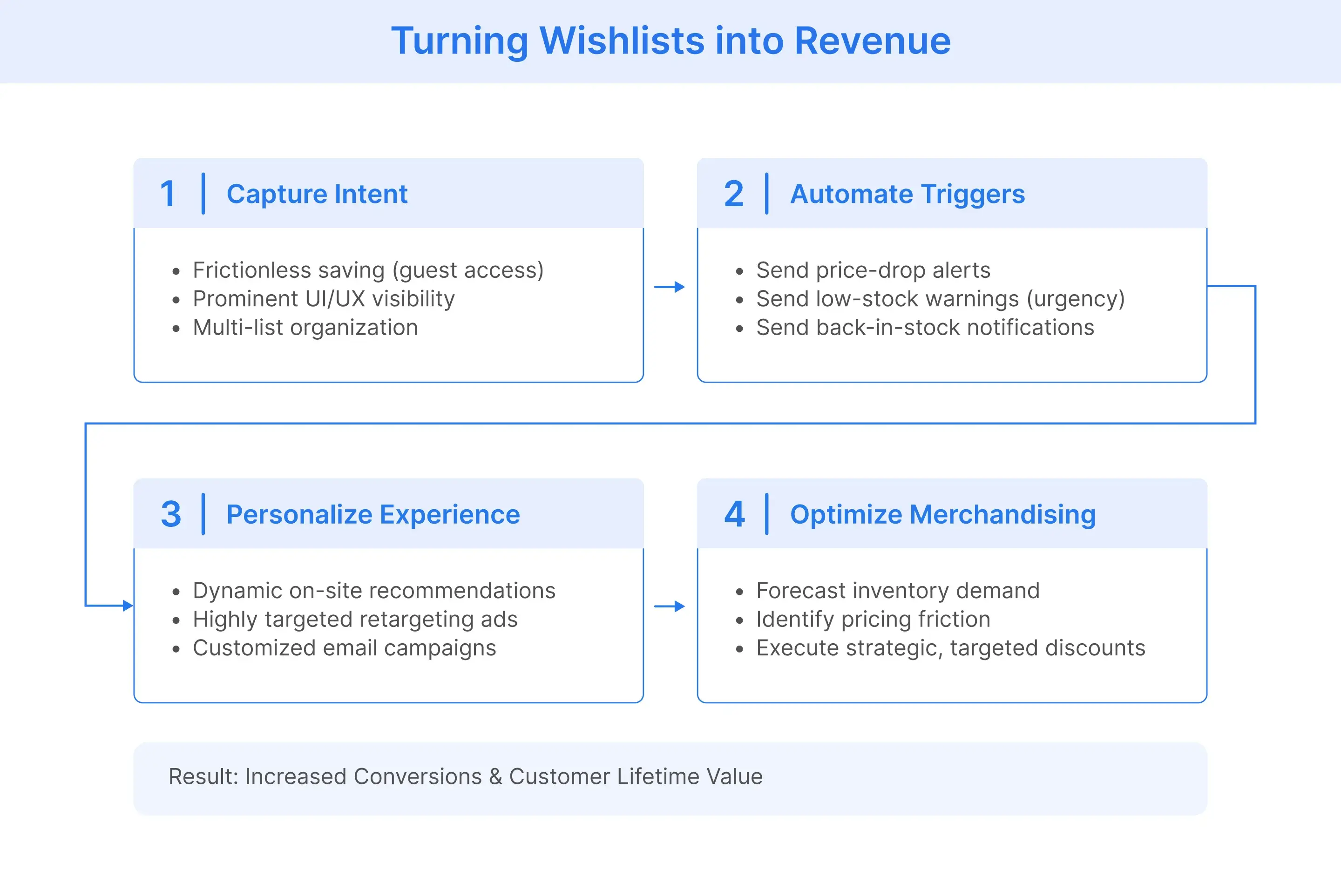
To drive measurable revenue from wishlists, retailers must transition from simply allowing customers to save products to actively leveraging that first-party data. By optimizing the capture process, automating behavioral triggers, personalizing the shopping experience, and using the data to inform merchandising, retailers can successfully convert delayed interest into immediate sales.
Phase 1: Optimize the Capture Process
Before you can leverage wishlist data, you must maximize the number of shoppers actually using the feature. The goal is to remove friction and make saving products as intuitive as adding them to the cart.
- Enable guest wishlists: Allow unregistered users to save items temporarily using cookies, prompting them to create an account only when they want to permanently save or share their list.
- Improve visibility: Ensure the "Add to Wishlist" (often a heart icon) is prominently displayed on category pages, product detail pages, and even within the shopping cart for items users want to remove but not forget.
- Allow multi-list creation: Enable users to organize their saves by category, event, or recipient (e.g., "Summer Wardrobe" or "Holiday Gifts") to increase long-term engagement.
Phase 2: Deploy Automated Re-Engagement Triggers
Once a customer saves an item, the retailer must actively work to bring them back to the site. Wishlist data allows you to create highly personalized, automated email and SMS workflows based on product lifecycle changes.
- Price-drop alerts: Automatically notify shoppers when an item on their wishlist goes on sale. This is the single highest-converting wishlist trigger.
- Low-stock warnings: Create authentic urgency by warning customers when a saved item is about to sell out.
- Back-in-stock notifications: If a user wishlists an out-of-stock item (or a specific size/color), automatically alert them the moment inventory is replenished.
Phase 3: Personalize the Shopping Experience
Wishlist data provides a precise roadmap of what a customer wants, which should be used to customize their broader shopping experience both on and off your website.
- Dynamic on-site recommendations: Adjust homepage banners and "Recommended for You" carousels to prominently feature items from the user's wishlist, alongside complementary products.
- Targeted ad retargeting: Sync wishlist data with your advertising platforms (like Meta or Google) to show users highly relevant display ads featuring the exact products they saved, rather than generic brand ads.
- Clienteling for high-value items: For luxury or high-ticket retail, alert sales associates or customer service reps when VIP customers wishlist premium items, allowing for personalized outreach.
Related read: What Is Social Retargeting? Strategy & Best Practices
Phase 4: Inform Inventory and Merchandising Decisions
Aggregated wishlist data is a predictive tool for inventory management and pricing strategies. It tells you what people want to buy, even if they aren't buying it yet.
- Demand forecasting: Identify products with high wishlist add rates but low conversion rates. This often indicates the product is highly desirable but priced too high.
- Strategic discounting: Instead of applying site-wide discounts, selectively discount items that have the highest aggregate wishlist counts to guarantee a surge in sales.
- Inventory purchasing: Use wishlist volume to confidently determine reorder quantities for trending items before they completely run out of stock.

How Can Flipkart Commerce Cloud Help Retailers Turn Wishlist Data into Revenue?
A wishlist is more than a convenient way for shoppers to save products for later. It is a goldmine of explicit purchase intent. However, collecting that data is only the first step. To drive real revenue, retailers must use those insights to re-engage shoppers and tailor the buying journey.
Flipkart Commerce Cloud (FCC) helps enterprise retailers transform static wishlist data into personalized, high-converting shopping experiences. By combining a robust Customer Data Platform (CDP) with AI-powered merchandising, FCC enables businesses to:
- Automatically trigger personalized price-drop and back-in-stock notifications.
- Serve highly relevant, dynamic product recommendations based on saved items.
- Leverage real-time intent data to optimize inventory and pricing strategies.
Ready to stop leaving high-intent sales on the table? Book a demo to discover how FCC can help you turn wishlist data into measurable e-commerce growth.

FAQ
Yes. While wishlists might seem like a delay tactic for hesitant shoppers, they capture explicit, high-intent data. Retailers who send automated price-drop or low-stock alerts based on saved items routinely see higher conversion rates from these personalized notifications, directly turning saved interest into tangible revenue.
A shopping cart is designed for immediate transactions, whereas a wishlist is a curation and planning tool. Shoppers use carts for items they intend to buy right now and wishlists for items they are comparing, waiting for a discount on, or saving for a future event.
Yes, allowing guest wishlists significantly reduces friction. You can use session cookies to save a user's items temporarily. However, you should intuitively prompt them to create an account to save their list permanently across devices, which allows you to capture their email address for future marketing efforts.
Wishlist data enables highly personalized, automated campaigns. The most effective strategies include triggering an email when a saved item goes on sale, when its stock is running low (creating urgency), or when an out-of-stock item is finally replenished.
Absolutely. By analyzing which products are frequently wishlisted but rarely purchased, merchandisers can gauge raw market demand. This helps buyers accurately order inventory for trending items before they peak, or apply strategic discounts to highly desired products that might be facing price resistance.
To maximize usage, place a recognizable icon (typically a heart or bookmark) directly on product detail pages next to the "Add to Cart" button. You should also include it on category pages for quick saving, and within the shopping cart itself (giving users a "Save for Later" alternative rather than simply deleting an item they aren't ready to buy).
Yes. By syncing your e-commerce platform's first-party data with advertising networks like Meta or Google, you can serve dynamic display ads featuring the exact products a shopper saved. This drastically improves ad relevance and your Return on Ad Spend (ROAS) compared to generic brand campaigns.
Yes, though they are often framed as "Requisition Lists" or "Saved Orders." In B2B commerce, buyers frequently purchase the same bulk supplies on a recurring schedule. Allowing them to save these specific SKUs into custom lists streamlines their procurement process and strongly encourages repeat business.
From a retailer’s perspective, when a shopper clicks the "Add to Wishlist" button, your e-commerce platform logs that specific product SKU against their account. The system then continuously cross-references these saved items with your live catalog data. This architecture allows your commerce engine to aggregate product demand for merchandising insights and automatically trigger personalized marketing workflows, such as firing an email alert the exact moment a saved SKU experiences a price drop or an inventory restock.